Keyword Research
Discover keyword opportunities based on Google Search Console data. Find Quick Wins, High Potential keywords, and competitor content gaps to fuel your SEO strategy.
An SEO Opportunity Panel Powered by Search Console Data
Knowing which keywords to target is the foundation of SEO. But with hundreds of keywords in your Search Console data, it’s hard to know which ones deserve your attention right now.
Keyword Opportunities is ShubHQ’s SEO opportunity panel that analyzes your Google Search Console data to surface keywords that are close to ranking but not yet receiving clicks. The module automatically detects these hidden opportunities, classifies them by search intent, and provides concrete action recommendations for each one. Instead of spending hours in spreadsheets, you get an actionable list of what to fix, what to create, and what to update.
The core purpose is to make hidden SEO gains visible and turn them directly into content actions: Should you write new content, update an existing page, or rewrite the meta title? The module answers all of these in a single panel.
 Page Structure
 1. Header
The top section introduces the module with its core value proposition.
| Element | Description |
|---|---|
| Title | Keyword Opportunities & Search Intent Insights |
| Description | ”Automatically find the keywords your SaaS can rank for and turn them into actionable content ideas.” |
 2. Filters
Three core filters to narrow down your data:
| Filter | Description |
|---|---|
| Date Range | Select the time window (e.g. Last 3 Months, Last 6 Months, Last 12 Months). |
| Country | Filter by country (Global or specific country). |
| Device | Filter by device type (All Devices / Mobile / Desktop / Tablet). |
| Refresh Data | Button to re-pull data from Search Console. |
These filters let you focus the opportunity analysis on specific markets or device types.
Product Screenshots

The filters bar with Date Range, Country, and Device selectors, alongside the Quick Wins table.
 Modules
 1. Quick Wins (Position 8-20)
The highest action value module on the page.
Scope:
“Keywords where you are on Page 2 or bottom of Page 1. Small improvements can yield big traffic.”
These are keywords ranking on Google’s Page 2 or the bottom of Page 1. For these keywords, even a small improvement can deliver significant traffic gains because Google already considers your content relevant, it just needs a final push.
Table Columns:
| Column | Description |
|---|---|
| KEYWORD | The keyword (e.g. free website monitoring, wordpress monitoring plugin). |
| CLICKS | Current click count. |
| IMPRESSIONS | Number of impressions. |
| AVG POSITION | Average ranking position (e.g. 18.8, 8.4). |
| DIFFICULTY (AI) | AI-estimated difficulty level (Low / Medium / High). |
| SUGGESTED ACTION | Recommended action (e.g. “Rewrite Meta Title/Desc”, “Update content with new stats”). |
| ACTION | + Growth Plan button to send the opportunity directly to the Content Growth Plan module. |
Top Action:
| Action | Description |
|---|---|
| Export CSV | Export the entire Quick Wins list as a CSV file. |
How to use:
The strategy for these keywords is to make targeted improvements: update the title and meta description, refresh content with latest statistics, or revise the page to better match search intent. In most cases, you don’t need to write new content, a focused update is enough.
Product Screenshots
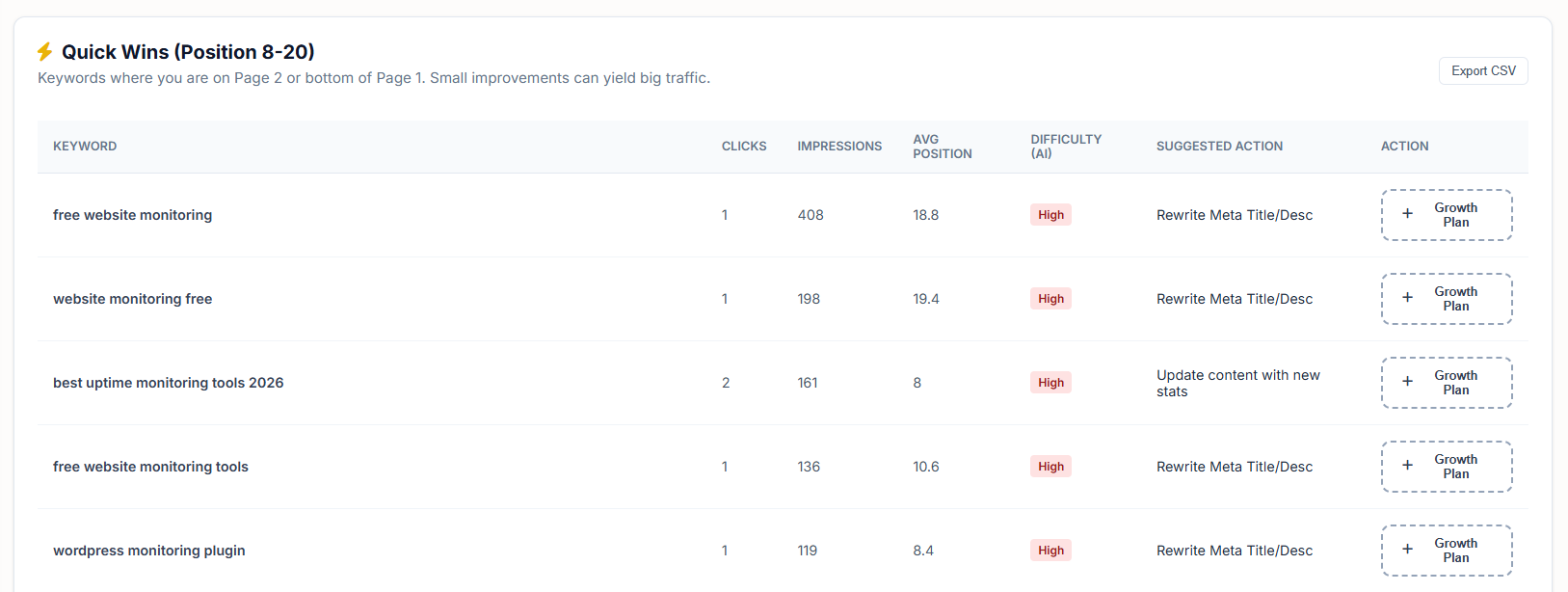
The Quick Wins table showing keywords, positions, difficulty scores, and suggested actions with Growth Plan buttons.
 2. High Potential (Position 20-40)
Keywords that show promise but require investment to reach Page 1.
Scope:
“Keywords showing promise but needing dedicated content or major updates.”
Google shows these keywords at lower positions, but when impression counts, page authority, and intent alignment are evaluated together, these are keywords that can be moved to Page 1 with the right content strategy.
Table Columns:
| Column | Description |
|---|---|
| KEYWORD | The keyword (e.g. 3xx status code, agency uptime monitoring). |
| IMPRESSIONS | Number of impressions. |
| AVG POSITION | Average ranking position (e.g. 38.9, 22.4). |
| SEARCH INTENT | Intent category (Informational / Commercial / Mixed / Navigational / Transactional). |
| AI SUGGESTION | AI-generated content idea (e.g. “Create ‘Best X for Y’ Comparison Article”). |
| ACTION | Add to Calendar button to add the idea to your content calendar. |
How to use:
These keywords generally require a new dedicated piece of content or a deep refresh of existing content. AI generates a content idea specific to each row; with one click, you can transfer it to your content calendar and include it in your editorial plan.
Product Screenshots
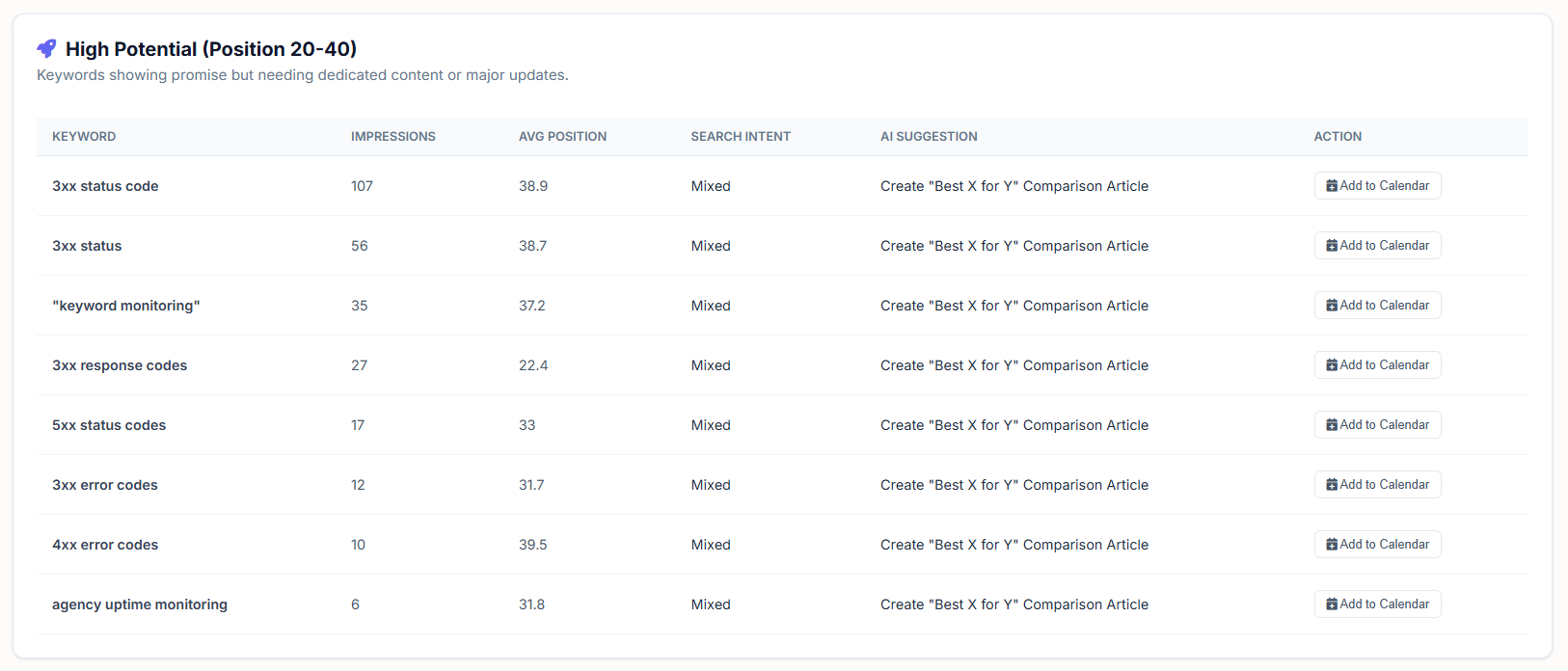
The High Potential table showing keywords with search intent labels, AI suggestions, and Add to Calendar buttons.
 3. Competitor Content Gap
Discovers keywords that don’t exist on your site but your competitors rank for.
Header Area:
| Element | Description |
|---|---|
| Competitor Domains | Two input fields for competitor domains (e.g. competitor1.com, competitor2.com). |
| Analyze Gaps button | Starts the comparative analysis. |
Result Cards:
Each gap opportunity is displayed as a card.
| Field | Description |
|---|---|
| Keyword | The gap keyword (e.g. enterprise resource planning, free crm for startups). |
| Description | ”Missing on your site, Competitor 1 ranks #3” |
| Estimated volume | e.g. +2.5k Vol, +1.2k Vol, potential monthly traffic if you rank for this keyword. |
| Target This button | Mark this keyword as a content target. |
How to use:
Which keywords do your competitors have an advantage on? Which content topics are missing from your site? This module lets you reverse-engineer competitor strategy to identify your own content gaps. It’s the practical application of the principle: “Don’t miss the conversation in your market.”
Product Screenshots

The Competitor Content Gap module with competitor domain inputs and gap opportunity cards.
How It Works
| Step | Description |
|---|---|
 1. Data Connection 1. Data Connection | Pull the last 3/6/12 months of performance data from Google Search Console. |
| 2. Position Segmentation | Keywords are split into three groups by ranking range: 8-20 (Quick Wins), 20-40 (High Potential), 40+ (addressed via Content Gap). |
 3. Search Intent Classification 3. Search Intent Classification | AI determines the search intent for each keyword (informational, commercial, navigational, transactional, mixed). |
| 4. AI Action Recommendation | A content action is generated for each keyword based on its intent (meta revision, content update, comparison article, best-of list, etc.). |
 5. Difficulty Estimation 5. Difficulty Estimation | AI estimates ranking difficulty (Low / Medium / High). |
| 6. Action Transfer | User sends the opportunity to Content Growth Plan or Content Calendar with one click. |
| 7. Competitor Comparison | SERP comparison against user-added competitor domains; keywords you don’t rank for are listed as gaps. |
Search Intent Categories
The page classifies search intents into the following core categories:
| Category | Description | Best Content Format |
|---|---|---|
| Informational | Information seeking. e.g. “what is uptime monitoring”. | Blog posts and guides. |
| Commercial | Commercial research. e.g. “best uptime monitoring tools”. | Comparison and “best of” lists. |
| Transactional | Transaction intent. e.g. “uptime monitoring free trial”. | Landing pages and pricing pages. |
| Navigational | Brand-specific navigation. e.g. “robotalp pricing”. | Optimize your own pages. |
| Mixed | Unclear intent. The page should serve both informational and commercial needs. | Hybrid content (guide + comparison). |
AI recommends a specific content format based on each keyword’s classification, turning raw keyword lists into actionable recommendation lists.
Use Cases
| Use Case | What You Gain |
|---|---|
| Monthly SEO Sprints | Open the Quick Wins list at the start of each month and target 5-10 quick gains. |
 Content Calendar Fill Content Calendar Fill | Transfer AI suggestions from the High Potential list to build a quarterly content plan. |
 Underperforming Page Refresh Underperforming Page Refresh | Identify keywords stuck on Page 2 and update the relevant content. |
| Meta Optimization | Run a meta refresh session on pages tagged “Rewrite Meta Title/Desc” to boost CTR. |
| Competitor Strategy Gap | Use the Competitor Content Gap module to find and close market gaps with targeted content. |
| Annual Strategy Meetings | Shape your annual SEO plan based on real data (impressions + position + intent). |
| Investor / Executive Report | Report the volume of opportunities you’re sitting on with concrete numbers. |
 CTR Issue Resolution CTR Issue Resolution | Improve titles and descriptions for keywords with high impressions but low clicks. |
 ShubHQ Integrations
Keyword Opportunities is not a standalone module, it connects directly to ShubHQ’s content production pipeline:
| Integration | How It Connects |
|---|---|
| Content Growth Plan | Quick Wins opportunities are transferred directly to the growth plan. |
| Content Calendar | High Potential AI suggestions drop into the calendar with one click. |
| Rank Tracking | Add target keywords to your rank tracking for ongoing monitoring. |
| Competitor Analysis | Send competitors from the Content Gap module for detailed analysis. |
| Outreach Logbook | Connect backlink strategy for new content to your outreach logbook. |
This integration completes the flow of “see the opportunity, turn it into a decision, implement it, monitor it” all within a single panel.
 Plans & Limits
| Resource | Description |
|---|---|
| Date Range | Access to 3 / 6 / 12 months of historical data (may vary by plan). |
| Country Filter | Global and country-level breakdown available on all plans. |
| Device Filter | Mobile/Desktop separation available on all plans. |
| Competitor Content Gap | Number of competitor domains for comparison varies by plan (e.g. 2/5 competitors). |
| Export CSV | Quick Wins and High Potential lists can be exported as CSV. |
| AI Suggestion Quota | AI content suggestions are managed with daily/monthly limits; higher plans have higher limits. |
Tips & Best Practices
- Make Quick Wins a weekly habit. Keywords on Page 2 can usually be moved to Page 1 with 1-2 weeks of small revisions.
- Watch out for Mixed Intent keywords. These typically need both informational and commercial content; comparison articles (Best X for Y) are often the best format.
- Prioritize low-CTR keywords. If you’re on Page 1 but not getting clicks, the problem is in the title/meta description.
- Add AI suggestions to your content calendar 30 days ahead. Allow time for writing, visuals, and publishing workflow.
- Refresh Competitor Content Gap monthly with updated competitors. New players in the market create different gaps.
- Cross-reference with Trend Intelligence. Combine weekly trends from the Trend Intelligence module with the High Potential list to publish the right content at the right time.
- Put High Difficulty keywords into long-term plans. Prioritize Low/Medium Difficulty keywords for quick wins.
 Roadmap, Planned Modules
The following modules are planned to expand Keyword Opportunities into a comprehensive SEO strategy engine:
Search Intent Traffic Score
An “intent alignment score” (0-100) calculated for each keyword.
- Shows how well your page matches the actual intent.
- Low score = content-intent mismatch warning.
Traffic Estimation Calculator
- Projection: “Moving from position 18 to position 5 would gain approximately X monthly clicks.”
- Total potential traffic calculation for Quick Wins.
- Annual SEO ROI report.
Automatic Meta Revision Tool
AI-generated 3 alternative titles + meta descriptions for low-CTR keywords.
- A/B testing suggestions.
- One-click transfer to CMS (WordPress / Webflow / Astro integrations).
Cluster-Based Opportunity View
Group similar keywords into clusters (e.g. variations of “uptime monitoring”).
- Total opportunity volume per cluster.
- Single “pillar content” recommendation per cluster.
Seasonality Tag
Annual seasonality indicator for each keyword.
- Warning: “This keyword peaks in May-July.”
- Cross-data with Trend Intelligence.
URL Targeting
Automatically show which page is associated with each keyword.
- Flag competing URLs for the same keyword (cannibalization).
- Suggestion: “This is the strongest URL for this keyword.”
One-Click Content Brief
Generate a content brief from any High Potential row with one click.
- H2/H3 outline + target keywords + question headings + competitor analysis.
- Direct export to Notion / Google Docs / Trello.
Featured Snippet & SERP Feature Opportunity
Automatically detect which keywords have Featured Snippet potential.
- People Also Ask expansion suggestions.
- AI Overview inclusion probability ranking.
Multi-Domain Comparison
View opportunities at the portfolio level if the company has multiple domains/subdomains.
- Allocation: which domain should target which opportunity.
Tagging & Notes System
User notes, tags, and status markers (new / in progress / completed) for each opportunity.
- Team mode assignment (who is responsible for which keyword).
Automated Weekly Opportunity Digest
Every Monday morning, an email with 5 recommended opportunities for the week.
- Combined Quick Wins + High Potential summary.
- Slack / Telegram integration.
AI Strategy Assistant
An AI that reviews all opportunity data and generates a 3-month SEO roadmap.
- Monthly output plan, expected results, and risk warnings.
- Structural plan: “12 quick wins + 6 high potential + 3 gap closures in the next 90 days.”
Consolidated Score Card
A personal “SEO Opportunity Score” (0-100) displayed on page load.
- 5 quick actions to improve the score.
- Historical score comparison trend.
Conversion Potential Score
Prioritize keywords with conversion potential, not just traffic.
- Transactional intent + high position = Priority 1.
- Estimate: “This keyword could bring 50 conversions per month.”
CTR Comparison
Compare expected CTR vs. actual CTR for each keyword’s position.
- Auto-flag keywords performing below expected CTR for their position.
- Derive meta optimization recommendations from this data.
Keyword Lifecycle Tracking
Track a keyword’s journey: Quick Wins, Top 10, Top 3, Featured Snippet.
- Automatic action recommendation at each stage.
- “Rescue plan” for keywords that drop back.
Content Type Recommendation
Suggest the most suitable content format based on keyword intent (blog, video, calculator, template, comparison).
- Per-format performance estimate.
- Multimedia content suggestions.
The Bottom Line
Keyword Opportunities is a strategic SEO opportunity panel that automatically detects keywords close to ranking but not yet receiving clicks, classifies them by search intent, and turns them into concrete action recommendations.
| What You Get | Why It Matters |
|---|---|
| Quick Wins (Position 8-20) | Fast path to move Page 2 keywords to Page 1 with minimal effort |
| High Potential (Position 20-40) | Identify growth areas that need dedicated content investment |
| Competitor Content Gap | Discover keywords your competitors rank for that you don’t |
| AI Suggested Actions | Get intent-specific content recommendations for every keyword |
| Search Intent Classification | Understand whether to write a guide, comparison, or landing page |
| Difficulty Estimation | Know which keywords are Low/Medium/High effort before investing |
| Pipeline Integration | Transfer opportunities directly to Growth Plan and Content Calendar |
Our roadmap includes intent scoring, automatic meta revision, cluster-based views, content brief generation, Featured Snippet detection, AI strategy assistant, and weekly opportunity digests, all designed to make this page the first strategic opportunity radar your SEO team opens during weekly planning sessions.
Get Started
Ready to uncover your hidden SEO opportunities?
- Navigate to Keyword Research from your dashboard
- Connect your Google Search Console account
- Set your Date Range, Country, and Device filters
- Review the Quick Wins list for fast-improvement keywords
- Check the High Potential list and add AI suggestions to your content calendar
- Enter competitor domains in the Competitor Content Gap module to find market gaps
- Use Export CSV to share findings with your team
Happy researching!