Backlink Analytics
A practical guide to investigating any domain's full backlink profile. Health Score, overview, anchors, link gap, history, top pages, tracked domains, and export tools.
A practical guide to backlink intelligence
Backlinks are still the strongest off-page ranking signal in 2026, but most teams either ignore them or get lost in vanity numbers. This guide walks you through what to actually look at, in what order, and how ShubHQ’s Backlink Analytics surfaces each piece.
Backlink Analytics queries a live index of 40B+ links and returns a full domain profile in under 30 seconds: overview, every individual backlink, referring domains, anchor distribution, 3-year trend, competitor link gap, and top pages, across seven tabs. You can analyze any domain, not just your own.
Good to know about freshness: Backlink data is sourced from a global backlink index that discovers links by continuously re-crawling the web. A newly created link becomes visible once the page pointing to you is crawled again, which typically takes 30 days to 4 months depending on how often that referring site is updated. Brand-new domains therefore start with only a handful of links, and coverage builds up automatically over the following crawl cycles. This timing applies to every domain equally, regardless of country or TLD.
 1. Start with a Domain Overview
Open Backlink Analytics, type a domain, hit Analyze. The Overview opens with a Health Score gauge on top and eight KPI cards below it.
The Health Score gauge
A composite 0 to 100 score, rendered as a circular gauge ring with a band (Good / Fair / Poor) and a one-line recommendation. It rolls up the signals that actually move rankings: referring-domain diversity, dofollow ratio, spam exposure, and link velocity. Click Why this score? to expand a drawer that shows exactly what cost you points and a prioritized “what to do next” list.
The CACHE / LIVE pill next to the domain name tells you whether the numbers came fresh from the index or from cache, so you always know how current the data is.
The eight KPI cards
| Metric | What it means |
|---|---|
| Domain Rating (DR) | A 0-100 score derived from the size and quality of the link profile, displayed on the Ahrefs scale (raw rank x 0.63 factor) so DR 39 here means roughly what 39 means on Ahrefs. |
| Referring Domains (RD) | Count of unique linking domains. This matters far more than total backlinks; a site with 200 RD will out-rank a site with 5,000 backlinks from a single domain. |
| Total Backlinks | The raw count of all links pointing to the domain, with a broken-link count below it. |
| DoFollow Ratio | The share of links passing authority, with the follow / nofollow split. |
| Referring IPs | Unique IPs across all referrers, plus subnet spread. A wide IP spread is healthier than a narrow one. |
| Referring Pages | The number of unique pages that link to the domain. |
| Spam Score | 0 is clean, 100 is toxic. Anything above ~30 deserves a manual audit. |
| First Seen | When the link profile first appeared in the index. |
Rule of thumb: if your RD < your competitor’s RD x 0.6, link gap is your bottleneck, not content.
Product Screenshots
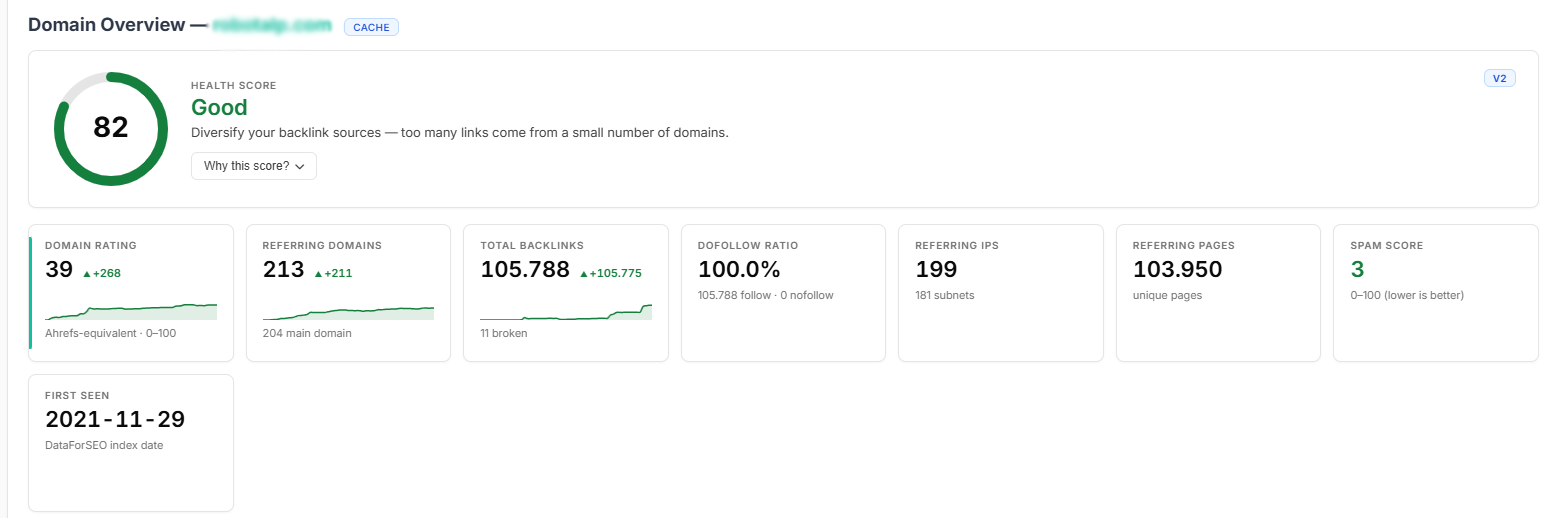
The Overview tab: a Health Score gauge up top, then eight KPI cards (Domain Rating, Referring Domains, Total Backlinks, DoFollow Ratio, Referring IPs, Referring Pages, Spam Score, First Seen), each with a sparkline trend and day-over-day delta.
 2. Read the link composition at a glance
Below the KPI cards, the Overview breaks the profile into five visual panels rendered as horizontal bars. This is where over-optimization and link-quality patterns become obvious without opening a single table:
- Link Types: anchor, image, redirect.
- Where on Page: footer, section, aside, nav, header, article. A profile that is almost entirely footer links is weaker than one with in-article links.
- Source Platforms: CMS, blogs, organization, ecommerce, message-boards. Tells you what kind of sites are linking.
- Link Attributes: nofollow, noopener, noreferrer, external, UGC.
- Top Countries: backlink origin by country, with flags. A site targeting
deshould have a healthy German slice.
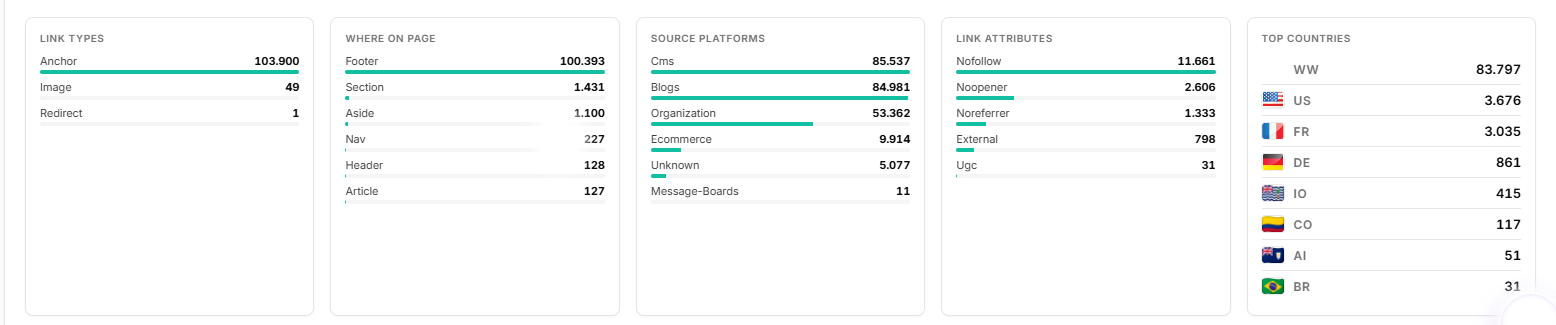
Five breakdown panels on the Overview: Link Types, Where on Page, Source Platforms, Link Attributes, and Top Countries.
 3. Inspect every individual backlink
The Backlinks tab gives you the live, complete list, not a sample. Every link the index has on the domain, paginated server-side so you can scroll through tens of thousands without freezing the browser.
| Column | What it tells you |
|---|---|
| Source URL | The page hosting the link. Click through to verify context. |
| Anchor text | What the link actually says, in italics. |
| Target URL | Which of the domain’s pages it points to. |
| DR | Domain Rating of the source (Ahrefs-calibrated). |
| Dofollow / Nofollow | Color-coded badge. Most platforms only show counts; we show per-link. |
| Spam Score | 0 to 100, color-graded. Useful for triaging disavow lists. |
| First / Last Seen | When the link first appeared in the index, and when it was last verified. |
| Live / Broken | Real-time status flag. |
Filters and sorting run server-side: filter by dofollow only, anchor contains, spam < 30, DR > 40, combine any of these and the result is recalculated against the full set, not the visible page. Hit CSV to export the filtered view.
 4. See linkers grouped by referring domain
The Referring Domains tab collapses thousands of individual links into one row per linking site. This is the view that matters for outreach prioritization: you don’t pitch URLs, you pitch domains.
| Column | What it tells you |
|---|---|
| Domain | The linking site, with its favicon. |
| DR | Authority of the linking site. |
| Backlinks | How many links it gives the target. |
| Country / TLD | Geographic origin, useful for local-SEO targets. |
| First Seen | When this domain first started linking. |
Two aggregation panels above the table:
- Top Countries: distribution of referring domains by country flag. A site ranking in
de.example.comshould have a healthy.deslice. - Top TLDs:
.com / .org / .edu / .gov / .io / ...breakdown. Heavy.govand.edupresence is a strong trust signal; heavy.xyzand.topis a red flag.
Use the country filter to narrow the table to a single market when you’re auditing geo-relevance.
 5. Audit your anchor distribution
Click the Anchors tab. The donut chart shows where your anchor text is concentrated:
| Bucket | Healthy share | Red flag |
|---|---|---|
| Branded (your name) | 30-50% | < 15% suggests under-branding |
| Exact match (target keyword) | 1-5% | > 10% looks manipulative to Google |
| Partial match | 15-30% | - |
| Naked URL | 5-20% | - |
| Generic (“click here”, “more info”) | 5-15% | - |
| Empty | < 10% | High share usually means image links |
If your exact-match share is too high, diversify anchors on new outreach. If branded share is low, focus on PR-style links that mention your brand by name.
The system classifies every anchor automatically into these six buckets. No manual tagging, no spreadsheets. Over-optimization screams at you the moment you open the tab.
 6. Find link gaps
Open the Competitors tab. ShubHQ pulls the domains that share the most referring sources with your target: your real organic competitors, not just the brands you assume you compete with.
Settings-aware: brands and competitors are pre-loaded
If you’ve added competitors under Settings → Profile → Competitor Tracking, they’re already wired into this page. The brand dropdown at the top of the analyzer reads directly from your saved brands, and Link Gap pre-fills your competitor list automatically: one click on Find Gap runs the comparison with the rivals you already care about. No copy-pasting domain names.
Otherwise, hit + Add to Gap manually on a few competitors and then click Find Gap. You’ll get every domain that links to your rivals but not to you: your fastest outreach list.
Tactic: Sort the gap result by DR descending, take the top 30, and feed them into your outreach tool. A 30% conversion to a guest-post or mention is realistic if the content fit is right.
What “Find Gap” returns
| Column | Description |
|---|---|
| Domain | The site linking to your competitor but not you |
| DR | Domain Rating (Ahrefs-equivalent) |
| Links to | Which of your competitors it links to |
| Backlinks | How many links it gives that competitor |
Results are sorted by DR by default. Export to CSV with one click.
 7. Watch the trend, not the snapshot
The History tab shows up to three years of monthly DR, RD, and backlinks. Two patterns matter:
| Pattern | What it means |
|---|---|
| Stair-step growth in RD | Healthy. You’re earning a few new linkers per week organically. |
| Spike-then-decay | Unstable. Either a viral piece (good but won’t last) or a paid-link campaign that lost links once the contracts ended (bad). |
The New vs Lost bar chart below makes link decay visible. If lost-RD outpaces new-RD for two consecutive months, you’re in net link decline, even if your raw total looks fine.
Ahrefs Lite ($129/mo) gives you 6 months of history. ShubHQ gives you ~3 years on every plan.
 8. Find your highest-leverage pages
The Top Pages tab ranks your URLs by inbound backlinks. Two moves to make immediately:
- Refresh these pages. A 2026 update on a 2022 article often re-triggers earned links.
- Internal-link from these pages to whichever page you’re currently trying to rank. You’re channeling external authority straight into the new target.
| Column | Description |
|---|---|
| URL | The page on the target domain |
| Backlinks | Total links pointing to this page |
| Referring Domains | Unique domains linking to this page |
| Page DR | Authority score for this specific page |
Sort by Backlinks, Referring Domains, or Page DR depending on your goal.
 9. Set up tracking for what matters
For domains you care about long-term, your own brand, top competitors, key acquisition targets, click Track. ShubHQ will:
- Re-fetch the full profile every 24 hours (uses 5 credits/domain/day from your plan).
- Diff the result against yesterday.
- Send you an in-app notification (and email + Telegram if you’ve enabled them) the moment a new referring domain or backlink appears.
You’re notified within a day of getting linked, not weeks later when you happen to open the dashboard. Every tracked domain shows its Health Score and sparkline trends for DR, Referring Domains, Backlinks, tracked keywords, and organic clicks in one consolidated Projects view.
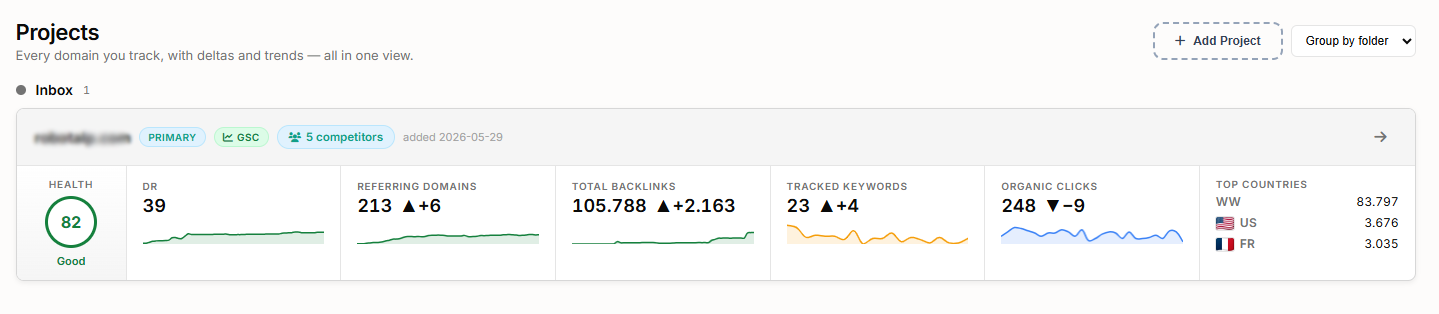
The Projects view: each tracked domain with its Health Score, plus DR, Referring Domains, Total Backlinks, Tracked Keywords, and Organic Clicks trends and deltas at a glance.
| Plan | Tracked domains | Brands | Competitors / brand |
|---|---|---|---|
| Free | 1 | 1 | 1 |
| Pro | 3 | 5 | 5 |
| Business | 6 | 10 | 10 |
 10. Export and report
Every tab has a CSV button (UTF-8, opens directly in Excel). The header has a Report (PDF) button that pre-warms all data sections and opens a print-ready single-page summary, ready to send to a client without copy-pasting numbers.
 Tools and limits you should know
| Tab | Cost (one-time, then cached) | Cache lifetime |
|---|---|---|
| Overview | 1 credit | 24 hours |
| Backlinks list | 2 credits | 24 hours |
| Referring Domains | 2 credits | 24 hours |
| Anchors | 2 credits | 7 days |
| History + Timeseries | 4 credits | 7 days |
| Competitors | 3 credits | 7 days |
| Link Gap | 5 credits | 7 days |
| Top Pages | 2 credits | 24 hours |
A full one-shot analysis with all tabs open costs ~20 credits. Cache hits are always free.
What makes it different
| Feature | ShubHQ Backlink Analytics | Ahrefs Lite ($129/mo) |
|---|---|---|
| Composite Health Score | Yes, with penalty breakdown | No |
| Historical depth | ~3 years | 6 months |
| Spam score per backlink | Yes (0-100) | Not published |
| Anchor over-optimization | Automatic (6 buckets) | Manual |
| Pricing model | Pay-per-query (~$0.20/audit) | $129/mo flat |
| 30-domain monthly audit | ~$6 | $129 |
| Link Gap | One click, auto-fills competitors | Manual export + VLOOKUP |
| Tracked domain alerts | Daily cron, in-app + email + Telegram | Manual checks |
| DR calibration | 0.63 factor to Ahrefs scale | Native |
Get Started
Ready to investigate your first domain?
- Open Backlink Analytics from your dashboard
- Type any domain and hit Analyze
- Read the Health Score gauge, then the eight KPI cards and the link-composition breakdowns
- Click Anchors to check for over-optimization
- Open Competitors and run Find Gap against your top 3 rivals
- Check History for trend patterns (stair-step vs spike-decay)
- Review Top Pages and plan internal links from high-authority URLs
- Click Track on your own domain and key competitors for daily alerts
Happy analyzing!