Trend Intelligence
Track weekly industry trends, top tools, key problems, and growth signals all AI-synthesized from Reddit, LinkedIn, and Google in a single dashboard.
An AI-Powered Weekly Trend Intelligence Module
In fast-moving industries, knowing what’s being talked about this week can be the difference between leading the market and chasing it. But manually scanning Reddit threads, LinkedIn posts, and Google articles across your sector takes hours and you still miss the signal in the noise.
Trend Intelligence is ShubHQ’s weekly trend synthesis module designed to show you which tools are gaining momentum, which problems are being discussed, and which growth trends are emerging in your target sector. Data is collected from Reddit, LinkedIn, and Google, then processed by AI to deliver a structured weekly brief.
The core purpose of this module is to answer the question “What’s being talked about in my industry this week?” in minutes instead of hours. Which tools are rising, which pain points are being debated, which growth signals are surfacing all synthesized into AI-powered weekly reports.
 Page Structure
 1. Header Bar
The top of the page contains the main navigation and controls for the Trend Intelligence module.
| Control | Description |
|---|---|
| Trend Intelligence | Page title displayed at the top. |
| Week Selector (e.g. 2026-W16) | Dropdown to switch between weekly reports. Access past weeks for historical trend data. |
| SaaS / Tech tab | View trends for the software, technology, and startup ecosystem. |
| E-commerce tab | View trends for the e-commerce and online retail sector. |
| Save Report | Save the current weekly report for future reference. |
| Past Reports (10) | Access the archive of previously saved weekly reports. |
Users can switch between industry sectors with a single click to view trend reports for different ecosystems.
Product Screenshots
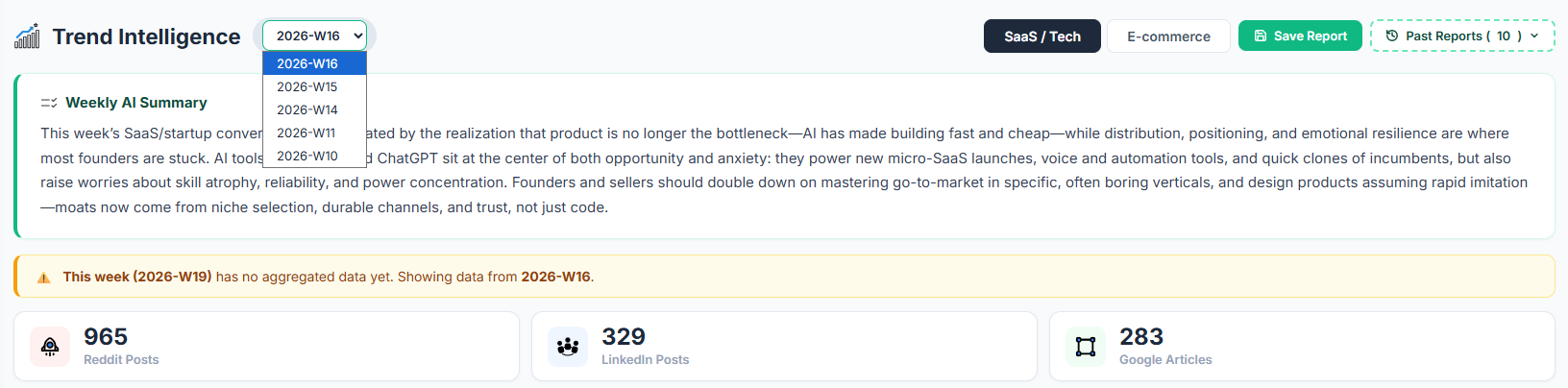
The header bar with week selector, industry sector tabs, Save Report button, and Past Reports access.
 2. Data Availability Notice
If the current week’s data hasn’t been collected yet, the system notifies the user with a clear message:
“This week (2026-W19) has no aggregated data yet. Showing data from 2026-W16.”
This ensures the user always knows which week’s data they are viewing no ambiguity about data freshness.
 3. Weekly AI Summary
One of the most important sections on the page. AI scans all data for the given week and produces a paragraph-level synthesis.
What it covers:
| Element | Description |
|---|---|
| Industry headline | The dominant topic or theme of the week in your sector. |
| Opportunities & risks | Key opportunities and risks surfaced from the data. |
| Strategic message | Actionable guidance for founders and marketers. |
| Market dynamics | How market conditions are shifting. |
Example:
“This week’s SaaS/startup conversations revolve around the reality that building is no longer the bottleneck AI makes it fast and cheap, but founders are struggling with distribution, positioning, and emotional resilience…”
This summary serves as the 30-second version of the entire page a critical quick-read for time-constrained users.
Product Screenshots
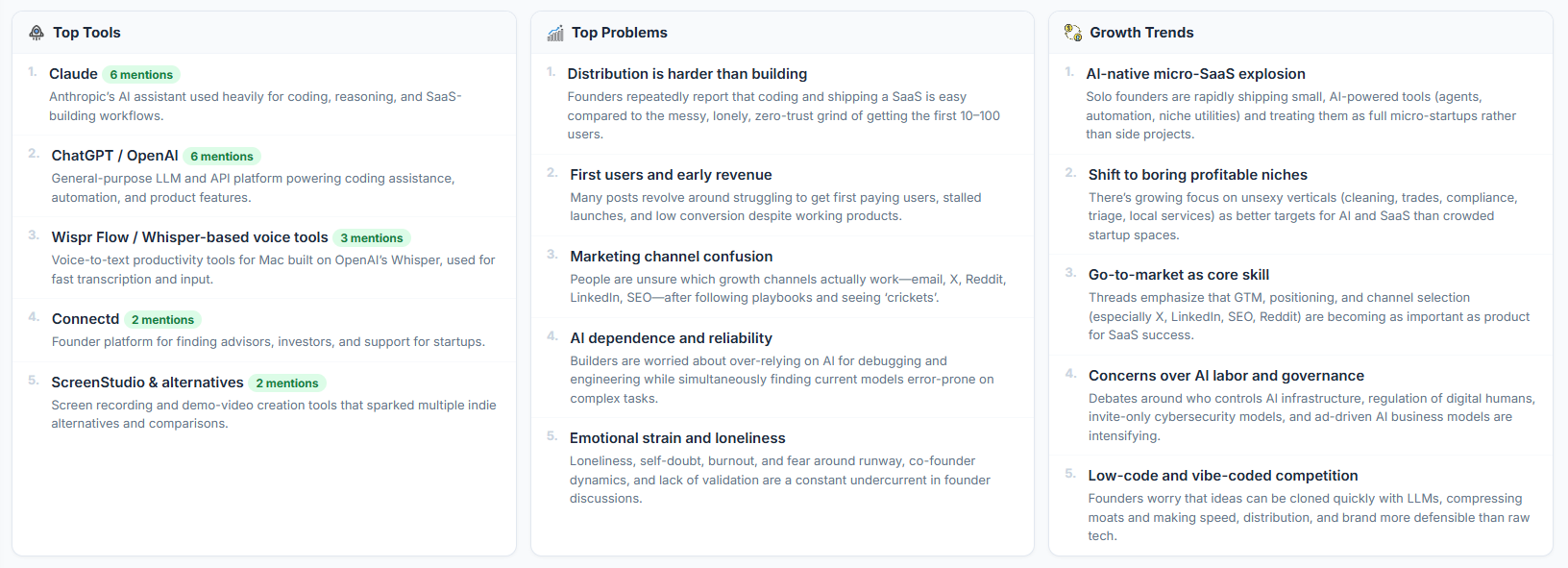
The Weekly AI Summary paragraph with data source counters showing Reddit, LinkedIn, and Google volumes.
 4. Data Source Counters
Three numerical counters display the volume of data collected from each source:
| Counter | Example | Description |
|---|---|---|
| Reddit Posts | 965 | Number of Reddit posts scanned that week. |
| LinkedIn Posts | 329 | Number of LinkedIn posts analyzed that week. |
| Google Articles | 283 | Number of Google articles included in the scan scope. |
These numbers transparently show the data volume behind the AI summary so users understand the depth of analysis.
 Three-Column Trend Panel
The core of the page three structured panels that break down the week’s trends into actionable categories.
 1. Top Tools
A ranked list of the most-mentioned tools and platforms in your industry that week.
Each tool entry includes:
| Field | Description |
|---|---|
| Rank number | Position in the list (1-10). |
| Tool name | e.g. Claude, ChatGPT / OpenAI, Wispr Flow / Whisper-based voice tools. |
| Mention count | e.g. 6 mentions, 3 mentions. |
| AI description | Context on why the tool is trending which use cases or discussions it appeared in. |
This panel is critical for identifying which tools are gaining momentum, what your competitors are talking about, and potential integration opportunities.
Product Screenshots
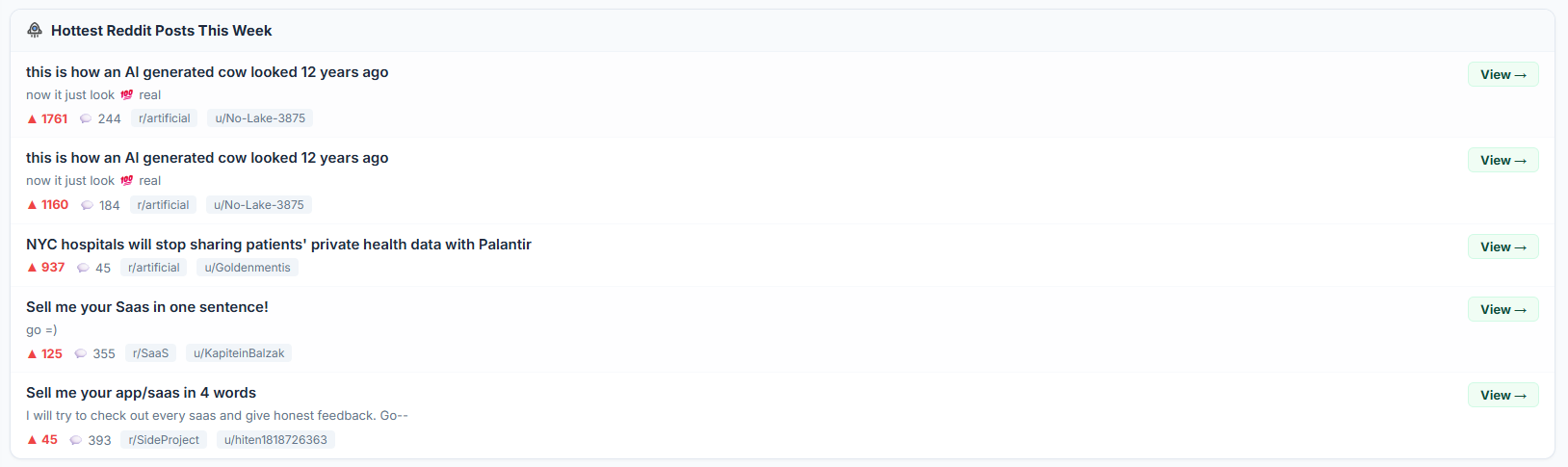
The Top Tools panel showing ranked tools with mention counts and AI-generated context descriptions.
 2. Top Problems
The most-discussed pain points and frustrations in your sector that week.
Each problem entry includes:
| Field | Description |
|---|---|
| Title | e.g. “Distribution is harder than building”, “First users and early revenue”. |
| AI description | Context on how the problem was raised and which user segments are affected. |
Example Problem Types:
| Category | Example Topics |
|---|---|
| Distribution | Difficulty getting products in front of users. |
| First users | Challenges with early-stage customer acquisition. |
| Marketing channels | Confusion about which channels to prioritize. |
| AI dependency | Concerns about reliability and over-reliance on AI. |
| Founder burnout | Emotional exhaustion and isolation. |
This panel is a goldmine for content creators the problems people are actually experiencing = content topics + product opportunities you can target.
Product Screenshots
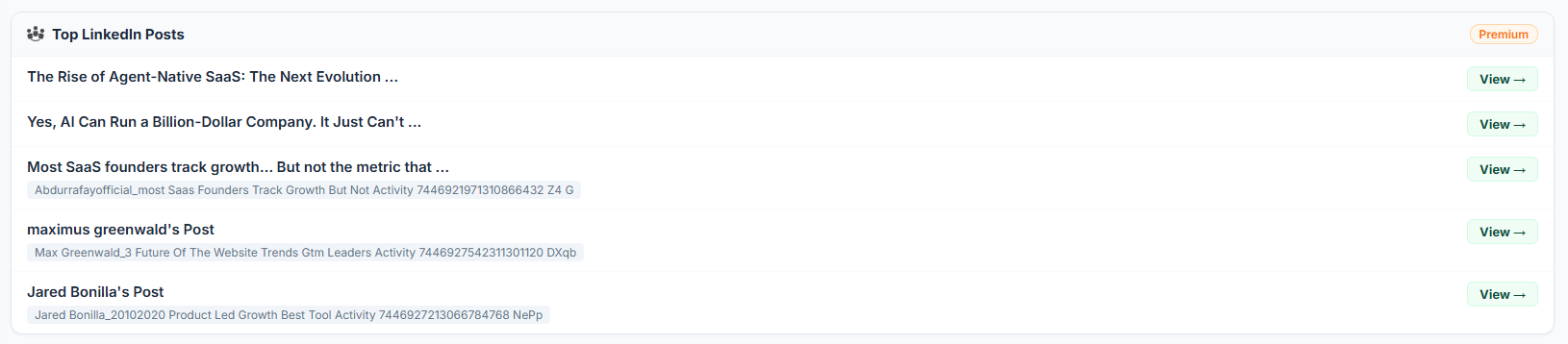
The Top Problems panel listing the most-discussed pain points with AI-generated context.
 3. Growth Trends
Emerging movements, paradigm shifts, and rising approaches in your sector.
Each trend entry includes:
| Field | Description |
|---|---|
| Title | e.g. “AI-native micro-SaaS explosion”, “Shift to boring profitable niches”, “Go-to-market as core skill”. |
| AI description | How the trend is forming and what indicators support it. |
Example Trend Categories:
| Category | Description |
|---|---|
| AI-native micro-SaaS | Explosion of small, AI-powered SaaS products. |
| Boring profitable niches | Shift away from hype toward sustainable, niche businesses. |
| GTM as core skill | Go-to-market expertise becoming a fundamental founder skill. |
| AI governance & labor | Debates around AI regulation and workforce impact. |
| New distribution channels | Experimentation with emerging distribution strategies. |
This panel gives you a 6-12 month forward view of your industry a reference point for strategic positioning before trends become mainstream.
Product Screenshots
The Growth Trends panel showing emerging movements with AI-generated trend descriptions.
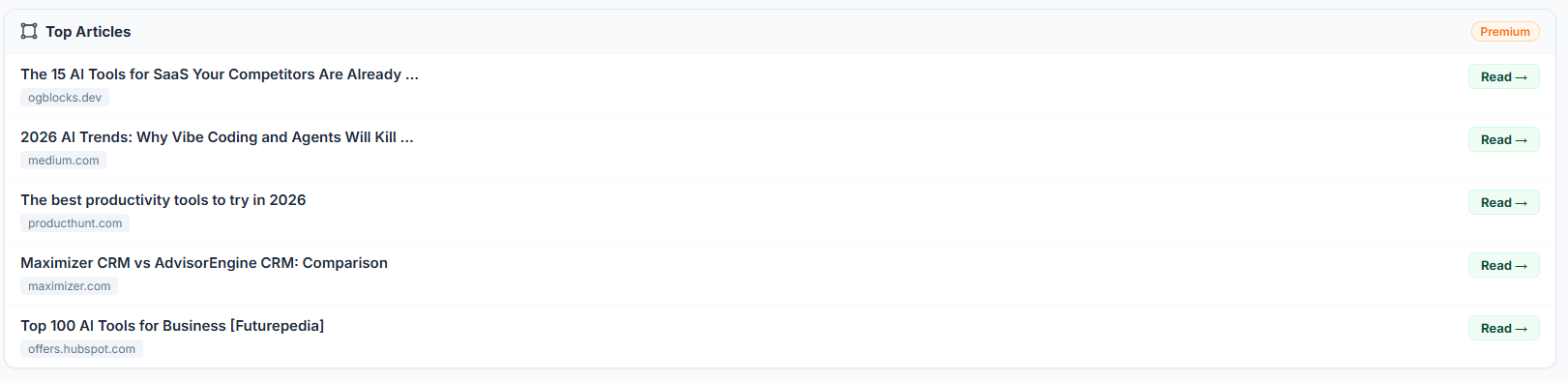
 Top Articles Premium
A curated list of the most-shared articles from across the web that week, published by authoritative sources.
Each article entry includes:
| Field | Description |
|---|---|
| Title | e.g. “The 15 AI Tools for SaaS Your Competitors Are Already…”. |
| Source domain | e.g. ogblocks.dev, medium.com, producthunt.com, maximizer.com, offers.hubspot.com. |
| Read button | Opens the article at its original source. |
This module ensures you never miss high-impact content circulating in your market useful for content strategy inspiration and understanding important publication styles. Available to Premium users only.
 Hottest Reddit Posts This Week
The posts with the highest momentum on Reddit that week.
Each post entry includes:
| Field | Description |
|---|---|
| Title | e.g. “Sell me your Saas in one sentence!”, “NYC hospitals will stop sharing patients’ private health data with Palantir”. |
| Snippet | A short description or preview of the post content. |
| Upvotes | e.g. 1761, 937. |
| Comments | e.g. 244, 355. |
| Subreddit | e.g. r/artificial, r/SaaS, r/SideProject. |
| Author | e.g. u/No-Lake-3875, u/KapiteinBalzak. |
| View button | Opens the post on Reddit. |
This module lets you keep your finger on the pulse of your industry’s community catch viral topics early and identify engagement opportunities.
 Top LinkedIn Posts Premium
High-engagement professional posts on LinkedIn related to your sector that week.
Each post entry includes:
| Field | Description |
|---|---|
| Title | e.g. “The Rise of Agent-Native SaaS: The Next Evolution…”, “Yes, AI Can Run a Billion-Dollar Company…”. |
| Author / activity | Author name and description of the post’s activity or context. |
| View button | Opens the post on LinkedIn. |
This module is ideal for tracking what decision-makers in the B2B ecosystem are focusing on. Available to Premium users only.
How It Works
| Step | Description |
|---|---|
| 1. Data Collection | The system collects sector-relevant content from Reddit, LinkedIn, and Google throughout the week. |
| 2. AI Processing | Collected data is categorized by a large language model tool mentions, problem statements, and trend indicators are extracted. |
| 3. Weekly Synthesis | At the end of the week, the Weekly AI Summary is generated and the three panels (Tools / Problems / Trends) are compiled as ranked lists. |
| 4. Ranking | Items are ranked by mention frequency, engagement volume, and content quality criteria. |
 5. Archiving 5. Archiving | Reports are automatically saved for each week enabling historical comparisons. |
 6. User Action 6. User Action | You save the report, add notes, and translate insights into content or product strategy. |
Use Cases
| Use Case | What You Gain |
|---|---|
| Weekly Briefing | Open as your first panel every Monday morning to get the week’s industry headline. |
| Content Topic Generation | Turn pain points from the Top Problems list into content headlines and article ideas. |
| Market Positioning | Read the 6-12 month signals from Growth Trends to position ahead of the curve. |
| Investor Presentations | Answer “What’s been happening in our sector over the last 3 months?” with data-backed insights. |
 Competitor Tool Tracking Competitor Tool Tracking | Spot rising competitors and potential integration opportunities from the Top Tools panel. |
| Reddit Networking | Gain visibility by engaging early with the week’s hottest Reddit posts. |
| LinkedIn Strategy | Analyze the formats and messaging patterns from Top LinkedIn Posts. |
| Editorial Plan | Build your monthly content calendar grounded in Trend Intelligence data. |
Industry Modes
SaaS / Tech
Covers software, startups, indie hackers, developer ecosystem, AI tools, B2B sales, and GTM strategy. Collects data from Reddit communities like r/SaaS, r/SideProject, and r/artificial, as well as LinkedIn conversations around SaaS founders and product teams.
E-commerce
Covers online retail, Shopify ecosystem, dropshipping, performance marketing, returns/logistics operations, and product launches. Collects data from channels where e-commerce operators discuss their challenges and strategies.
Users can switch between industry sectors with a single click to access trend reports for different ecosystems.
 Plans & Limits
| Resource | Availability |
|---|---|
| Weekly AI Summary | Available on all plans. |
| Top Tools | Available on all plans. |
| Top Problems | Available on all plans. |
| Growth Trends | Available on all plans. |
| Hottest Reddit Posts | Available on all plans. |
| Data Source Counters | Available on all plans. |
| Top Articles | Premium only. |
| Top LinkedIn Posts | Premium only. |
| Past Reports | Number of accessible past weeks varies by plan (e.g. last 10 weeks). |
| Industry Sectors | SaaS/Tech and E-commerce currently available; new sectors on the roadmap. |
 Roadmap Planned Modules
The following modules are planned to expand Trend Intelligence into a comprehensive weekly trend command center:
New Industry Modes
- Fintech & Crypto Financial technology, investing, and crypto ecosystems.
- Health & Wellness Health, fitness, and mental health applications.
- Education & EdTech Online courses, coding bootcamps, and education platforms.
- Creator Economy Content creators across YouTube, TikTok, and Substack ecosystems.
- AI Infrastructure LLM infrastructure, vector databases, and AI ops sub-segments.
Comparative Week Analysis
Side-by-side “this week vs. last week” comparison view.
- Which tool rose, which problem faded, which trend strengthened at a glance.
- 4-week rolling averages with trend direction indicators (up / flat / down arrows).
Trend Score & Momentum Indicator
A 0-100 momentum score for each tool, problem, and trend.
- Labels like “This trend has been rising for 4 straight weeks.”
- Visual distinction between emerging signals and saturated signals.
Keyword-Filtered Trend View
A custom trend report filtered by user-defined keywords.
- Example: “Only AI agent signals from Reddit r/Entrepreneur.”
- Personalized weekly summary based on your specific interests.
Time Travel & Trend Validation
A look-back report from the last 12 weeks showing which trends proved durable and which were hype.
- Answer: “It was on the agenda 6 months ago what’s the status now?”
- Tracking view for long-term trend validation.
AI Action Assistant
An AI panel that reads the weekly report and suggests 3-5 concrete actions.
- Recommendations like: “Write this content this week / Watch this competitor / Test this channel.”
- Integration with other ShubHQ modules (Content Radar, Outreach Logbook).
Content Brief Generation
Click any item from the Top Problems or Growth Trends list to generate an AI content brief.
- H2/H3 outline + target keyword + suggested titles.
- One-click draft blog post generation.
Sentiment & Tone Analysis
The tone in which the industry discusses each tool and problem (excited / skeptical / tired / hopeful).
- Sentiment map to align your content language with the market’s mood.
Influencer & Author Tracking
A list of the most impactful authors and influencers of the week.
- Outreach button to open a conversation (Outreach Logbook integration).
- Historical content analysis: “What topics do these people write about?”
Newsletter Mode (Email Digest)
A Trend Digest delivered to the user’s inbox every Saturday morning.
- Customizable headline set for Premium users.
- Modular preferences like “Only send me Top Problems.”
Trend Forecasting (AI Prediction)
AI predictions for what will happen in the next 4 weeks based on current signals.
- Forecasts like: “Micro-SaaS distribution will continue to be discussed next month.”
- Post-hoc accuracy scoring of predictions.
Geographic Breakdown
View the same week’s trends broken down by region US, Turkey, Europe, India, and more.
- Dedicated mode: “What’s being discussed in the Turkish SaaS ecosystem this week?”
Personalized Trend Scoring
A personalized view where AI highlights only signals relevant to your niche, product, and customers.
- “Top 5 trends that matter to you this week” summary.
Trend Watchlist
Add specific trends to a watchlist.
- Automatic Telegram/email notification for every new development related to that trend.
Community Comment Layer
A community layer where ShubHQ users can leave comments under trend items.
- Sharing like: “I also experienced this problem here’s my solution.”
- Most helpful comments are featured weekly.
Data Visualization (Charts & Heatmaps)
- Monthly trend intensity heatmap.
- Line charts for tool mentions over time.
- Donut charts for problem category distribution.
Export & Reporting
- Export weekly report as PDF / Notion / Google Slides.
- Branded internal presentation templates.
- Ready-made blocks for investor update letters.
The Bottom Line
Trend Intelligence synthesizes thousands of data points collected weekly from Reddit, LinkedIn, and Google into a single panel showing your industry’s top tools, most-discussed problems, and growth trends.
| What You Get | Why It Matters |
|---|---|
| Weekly AI Summary | Get the week’s headline in 30 seconds no manual research needed |
| Top Tools ranking | See which tools are gaining momentum and spot integration opportunities |
| Top Problems list | Discover real pain points to turn into content topics and product ideas |
| Growth Trends panel | Get a 6-12 month forward view for strategic positioning |
| Hottest Reddit Posts | Keep your finger on the community’s pulse and engage early |
| Top Articles (Premium) | Never miss high-impact content circulating in your market |
| Top LinkedIn Posts (Premium) | Track B2B decision-makers’ agenda on LinkedIn |
| Data Source Counters | Transparent view of the data volume behind every analysis |
Our roadmap includes new industry modes, comparative week analysis, AI action assistant, personalized trend scoring, trend watchlist, email digest, trend forecasting, geographic breakdown, community comments, data visualization, and export capabilities all designed to make this page a mandatory weekly habit for industry trend tracking.
Get Started
Ready to start tracking your industry’s weekly trends?
- Navigate to Trend Intelligence from your dashboard
- Select your industry sector SaaS / Tech or E-commerce
- Use the Week Selector to view the current or past weekly reports
- Read the Weekly AI Summary for a 30-second overview of the week
- Explore Top Tools, Top Problems, and Growth Trends for structured insights
- Check Hottest Reddit Posts for community-level signals
- Save the report for future reference with Save Report
Happy trend hunting!