SEO Audit
Analyze your website's SEO health end-to-end. Get an AI-powered Health Score, on-page checks, Search Console insights, and priority action recommendations.
A Comprehensive SEO Health Analysis Module
Knowing your website’s SEO health requires checking dozens of signals across technical infrastructure, on-page elements, content quality, backlink profile, and user experience. Opening multiple tools, comparing scattered data, and turning it into an action plan takes hours.
SEO Audit is ShubHQ’s end-to-end SEO analysis module that scans all SEO components in a single flow and produces a 0-100 SEO Health Score with AI-powered priority action recommendations. Instead of manually running audits across multiple tools, you click once, see your score, review ranked issues, and set your fix priorities.
The module is completely free and requires no Credits.
 Page Structure
 1. Header
The top section introduces the module with its current status.
| Element | Description |
|---|---|
| SEO Audit | Page title. |
| Description | ”Comprehensive SEO analysis based on your Project Scorecard data.” |
| Last Audit | Date and time of the most recent audit (e.g. Dec 31, 2025 14:21). |
| Score Badge (e.g. 65/100) | The latest calculated SEO Health Score. |
 2. Run New Audit
The command bar for launching a new SEO audit.
Content:
| Element | Description |
|---|---|
| Domain URL | The domain to analyze (e.g. https://robotalp.com). |
| Run New Audit button | Launches a new audit with one click. |
| Info label | ”Free, No Credits required”, completely free, no Credits consumed. |
Connection Labels:
| Label | Description |
|---|---|
| GSC Connected | Indicates that Google Search Console connection is active. |
| Uptime & Website Monitoring | Shows that site uptime monitoring data is included in the audit. |
Audit Scope:
| Scope Item | Description |
|---|---|
| On-Page SEO Analysis | Title, Meta, H1, Image alt tag checks. |
| Backlink Metrics from Scorecard | Backlink data from Project Scorecard. |
| Search Console Performance Data | Clicks, impressions, and ranking data. |
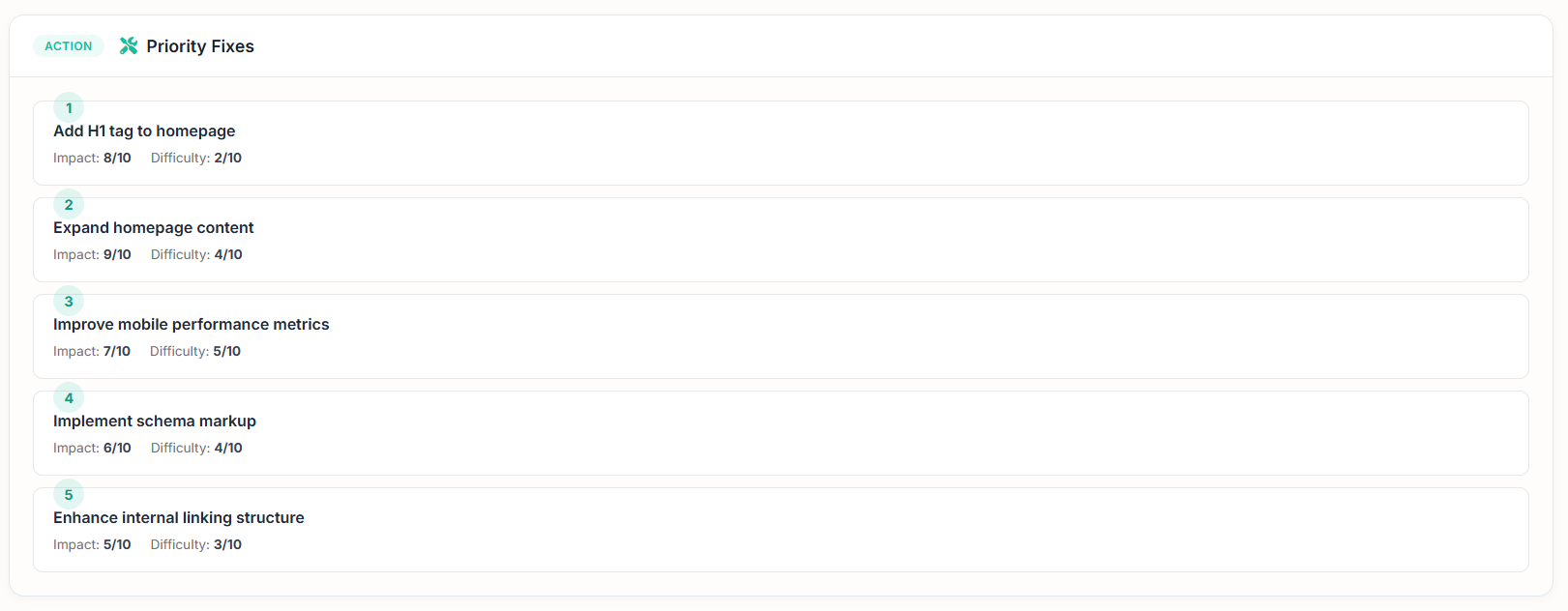
| AI-Powered Priority Fixes | AI-ranked fix recommendations. |
Product Screenshots
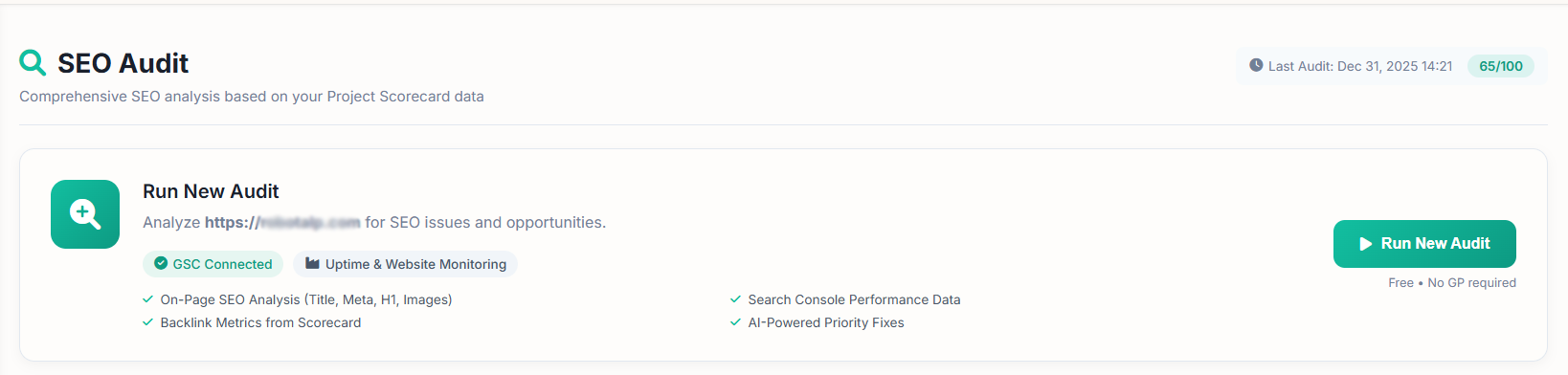
The header with SEO Health Score badge, Last Audit timestamp, and Run New Audit command bar.
 Modules
1. SEO Health Score
The central panel summarizing your site’s overall SEO status in a single score (0-100).
Content:
| Element | Description |
|---|---|
| Overall Score Circle (e.g. 65) | Weighted average of all sub-dimensions. |
| AI Commentary | Interpretation of the score with action guidance. |
Example AI Commentary:
“The website has a solid domain authority but suffers from thin content and missing key on-page elements like H1 tags. Prioritizing content expansion and fixing on-page SEO issues will enhance visibility and user engagement.”
Five Sub-Dimension Scores:
| Dimension | Example | What It Measures |
|---|---|---|
| Technical | 80 | Infrastructure health (sitemap, indexing, redirects, canonical, speed). |
| On-Page | 60 | In-page elements (title, meta, H1, alt tags, internal links). |
| Content | 50 | Content depth, quality, and thin content detection. |
| Backlinks | 70 | Backlink profile, referring domains, anchor diversity. |
| Experience | 75 | User experience signals (Core Web Vitals, mobile compatibility, engagement). |
Each dimension displays a colored progress bar from 0-100. Low scores appear in warning colors; high scores appear in green. This gives an instant view of where the site is strong and where it needs attention.
Product Screenshots
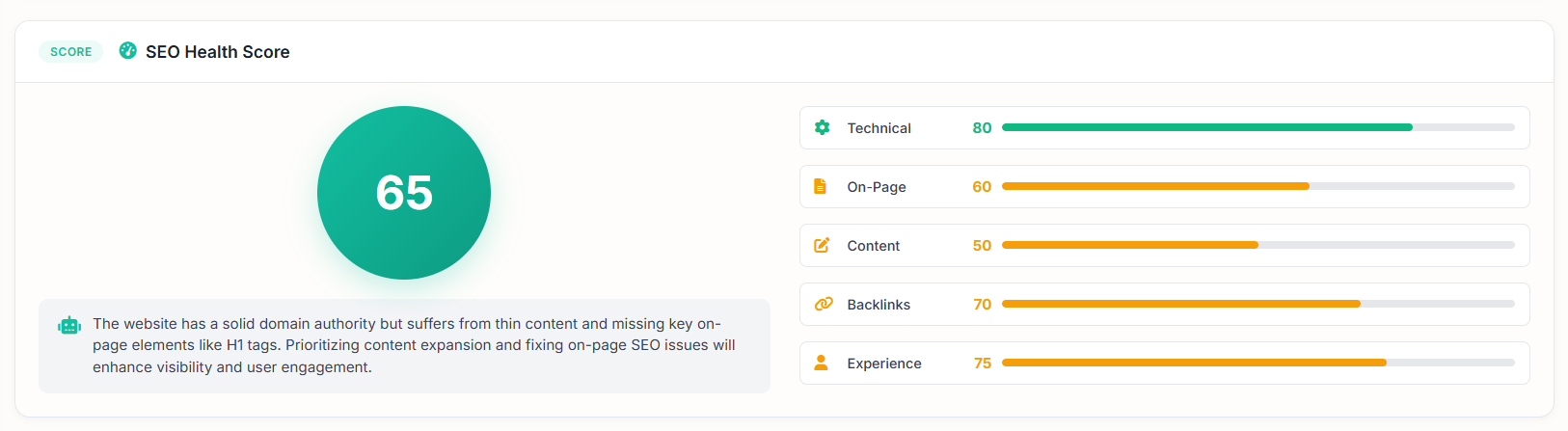
The SEO Health Score circle with AI commentary and five sub-dimension score bars.
 2. Search Console Insights
Real search performance data pulled from Google Search Console integration.
Top Metric Cards:
| Metric | Example | Description |
|---|---|---|
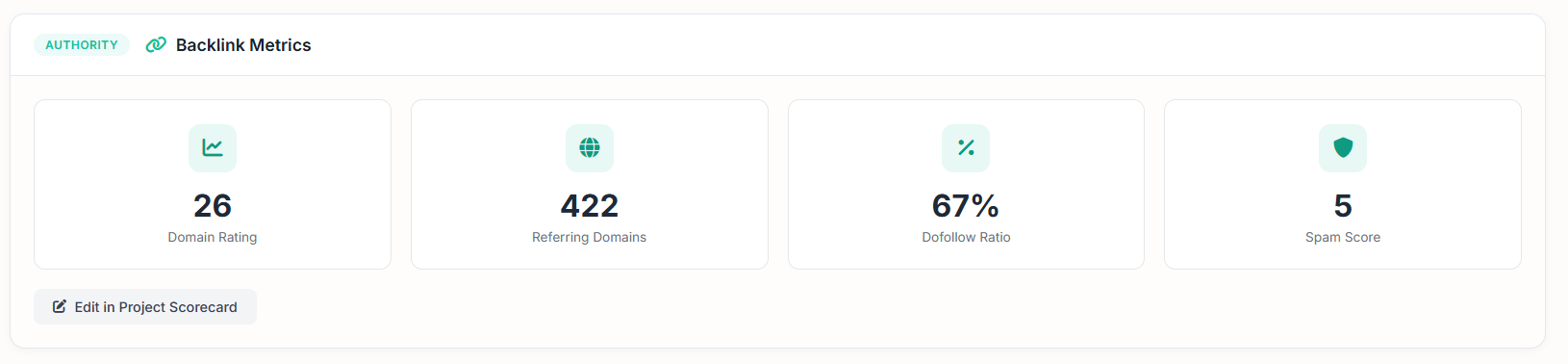
| Clicks | 304 | Total click count. |
| Impressions | 154,688 | Total impression count. |
| CTR | 20.0% | Click-through rate. |
| Avg Position | 31.4 | Average ranking position. |
Top Queries Table:
| Column | Description |
|---|---|
| KEYWORD | The keyword your site ranks for. |
| CLICKS | Clicks received for that keyword. |
| IMPRESSIONS | Impression count for that keyword. |
| POSITION | Average ranking position. |
Example Data:
| Keyword | Clicks | Impressions | Position |
|---|---|---|---|
| capitalization checker | 5 | 218 | 9.1 |
| title capitalizer | 3 | 2,378 | 4.9 |
| affiliate partnerprogramm | 1 | 1 | 61.0 |
| best price history checker | 1 | 1 | 7.0 |
This module provides a transparent view of your site’s real search traffic. You can clearly see which keywords bring traffic, which have high impressions but low clicks (CTR issues), and which are waiting on Page 2 as opportunities.
Product Screenshots
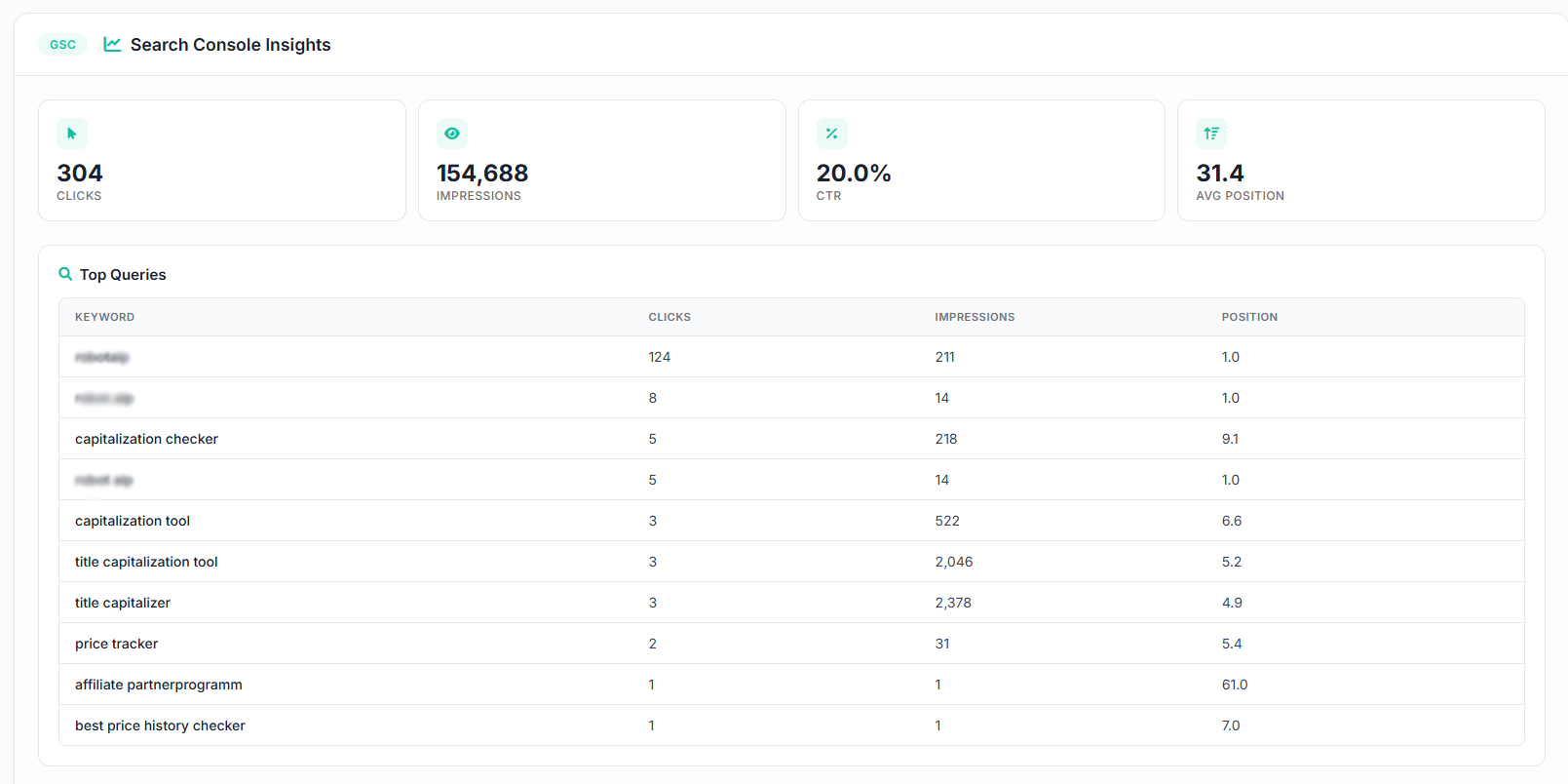
Search Console metric cards with Clicks, Impressions, CTR, and Avg Position alongside the Top Queries table.
 3. Sitemaps & Indexing
A technical panel showing how comprehensively Google has crawled and indexed your site.
Three Core Metrics:
| Metric | Example | Description |
|---|---|---|
| Sitemaps | 1 | Number of sitemap files defined in the system. |
| Submitted | 247 | Number of URLs submitted to Search Console. |
| Indexed | 267 | Number of pages indexed by Google. |
Interpretation Guide:
| Scenario | Meaning |
|---|---|
| Submitted < Indexed | Google discovered more pages than you submitted; your sitemap may be outdated. |
| Submitted > Indexed | Some pages are excluded from indexing; technical issues or quality filters may be active. |
| Submitted is approximately equal to Indexed | Healthy status. |
Product Screenshots

The Sitemaps & Indexing panel with Sitemaps, Submitted, and Indexed metrics.
 4. On-Page SEO Checks
Automated audit of on-page SEO elements across the site.
Checked Elements:
| Element | Example Success | Example Failure |
|---|---|---|
| Page Title | ”Title length is optimal (49 chars)" | "Title too short” |
| Meta Description | ”Meta description length is optimal (155 chars)" | "No meta description found” |
| H1 Tag | ”H1 tag present" | "No H1 tag found” |
| Image Alt Tags | ”All 5 images have alt tags" | "3 images missing alt tags” |
| Canonical Tag | ”Canonical tag present" | "No canonical tag” |
| Internal Links | ”21 internal links found" | "Very few internal links” |
| Redirects | ”No problematic redirects detected" | "2 redirect chains found” |
Visual Status Indicators:
| Indicator | Color | Meaning |
|---|---|---|
| Checkmark | Green | Check passed. |
| Cross | Red | Issue detected, priority fix recommended. |
Each card works with a color-coded warning system, letting the user see at a glance which elements have issues.
Product Screenshots

On-Page SEO check cards with green (pass) and red (fail) status indicators.
Additional on-page checks including canonical tags, internal links, and redirects.
Full audit overview combining Health Score, Search Console data, and on-page checks in a single view.
 How It Works
| Step | Description |
|---|---|
 1. Domain Definition 1. Domain Definition | The domain defined in Project Scorecard is automatically taken for analysis. |
| 2. GSC Connection | Google Search Console data is pulled. |
| 3. Crawler Execution | The system scans the page’s HTML structure and checks title, meta, H1, alt tags, canonical, and redirects. |
 4. Sitemap & Indexing Pull 4. Sitemap & Indexing Pull | Submitted/indexed URL counts are fetched from the GSC API. |
 5. Backlink Data 5. Backlink Data | Backlink metrics are added from the Project Scorecard infrastructure. |
 6. AI Score Calculation 6. AI Score Calculation | All dimensions are evaluated with weighting; a 0-100 score is produced. |
| 7. AI Action List | Priority fix recommendations are ranked for low-scoring areas. |
| 8. Results Screen | Summary cards, sub-dimension scores, GSC data, sitemap status, and on-page checks are presented to the user. |
 Use Cases
| Use Case | What You Gain |
|---|---|
 Monthly SEO Health Check Monthly SEO Health Check | Generate a one-click report at the start of each month. |
 New Site Launch New Site Launch | Verify SEO fundamentals of a newly launched site. |
| Crawl Issue Diagnosis | Detect indexing problems from the Submitted/Indexed gap. |
| CTR Problem Detection | Identify keywords with high impressions but low clicks for title optimization. |
| On-Page Gap Detection | Quickly spot missing H1 tags, meta descriptions, and alt tags. |
 Annual SEO Roadmap Annual SEO Roadmap | Convert low-scoring dimensions into yearly priorities. |
| Competitor Comparison | Compare your score against competitor scores from the Competitor Analysis module. |
 Client Presentation Client Presentation | Prepare client reports for agency users. |
ShubHQ Integrations
SEO Audit works integrated with ShubHQ’s other SEO modules:
| Integration | How It Connects |
|---|---|
| Project Scorecard | Backlink data and overall health score are sourced from this module. |
| Search Console (GSC) | Clicks, impressions, and ranking data are pulled from here. |
| Uptime & Website Monitoring | Site accessibility status affects the score. |
| Keyword Opportunities | Keywords with on-page issues drop directly into the opportunities list. |
| Rank Tracking | Low-performing ranking keywords can be transferred here. |
| Content Growth Plan | AI priority action list can be transferred to your content growth plan. |
This completes the flow of “audit, opportunity, content production, rank tracking” all within a single panel.
 Score Calculation Logic
The SEO Health Score is calculated as a weighted average of five sub-dimensions.
Dimension Breakdown:
| Dimension | What It Evaluates |
|---|---|
| Technical | Sitemap status, indexing rate, redirect health, canonical tag presence, page speed. |
| On-Page | Title/meta optimization, H1 presence, alt tag ratio, internal link structure. |
| Content | Content length, depth, thin content page count, multi-topic coverage. |
| Backlinks | Total backlink count, referring domain diversity, anchor distribution. |
| Experience | Core Web Vitals, mobile compatibility, engagement signals. |
Color Codes:
| Range | Color | Meaning |
|---|---|---|
| 80-100 | Green | Healthy. |
| 60-79 | Yellow/Orange | Improvement area. |
| 0-59 | Red | Priority intervention required. |
 Plans & Limits
| Resource | Description |
|---|---|
| Free, No Credits Required | The module is completely free, no Credits consumed. |
| Audit Frequency | Daily/weekly/monthly audit limits may apply based on your plan. |
| Domain Count | Audits can be run for as many domains as defined in Project Scorecard. |
| GSC Connection | Search Console account must be connected for click, impression, and ranking data. |
| History Retention | Past audit results are subject to retention periods based on your plan. |
Tips & Best Practices
- Fix red checks first. Fundamental issues like “No H1 tag found” have a disproportionate impact.
- Focus on CTR problem keywords. If position is good but clicks are low, rewrite the title and meta description.
- Monitor the Submitted/Indexed gap. A large gap signals a technical issue; check robots.txt and canonical tags.
- Track the score over time. A monthly trend view is more valuable than a one-time audit.
- Read the AI commentary as a mini executive summary. It’s sufficient for quick direction-setting.
- Always connect Search Console. Without it, the module’s power is cut in half.
- Share low-scoring areas with the right team. Technical team handles Technical, content team handles Content, SEO team handles On-Page.
- Re-run the audit within 30 days. You’ll see the concrete impact of the improvements you made.
- Get competitor scores (via Competitor Analysis). Knowing your industry benchmark helps with target-setting.
Roadmap, Planned Modules
The following modules are planned to expand SEO Audit into a comprehensive strategic audit center:
Historical Score Trend Chart
View each audit’s score on a timeline.
- Reflect the impact of improvements on a concrete graph.
- Monthly comparative bar chart.
Automated Audit Scheduling
Weekly or monthly automatic audits.
- Automatic Telegram/email alerts at specific score thresholds.
- Alarm: “Your score dropped more than 5 points, check it.”
Multi-Page Audit (Site-Wide Crawl)
On-page audit of all site pages, not just the homepage.
- Per-page individual score generation.
- List of which pages have H1/meta issues across the site.
Page Speed & Core Web Vitals Detail
Individual display of LCP, FID/INP, and CLS metrics.
- Mobile vs. Desktop separation.
- PageSpeed Insights integration.
Schema & Structured Data Audit
Check Schema.org structures present on the page.
- Suggestions for missing structured data (Article, Product, FAQ, BreadcrumbList).
- Rich snippet eligibility score.
Robots.txt & Sitemap Validator
Syntax check of the robots.txt file.
- Detect broken URLs in sitemaps.
- Flag incorrect noindex/nofollow directives.
Competitor Score Comparison
Side-by-side comparison of your Health Score with competitors.
- Which dimension are you behind/leading on?
- Industry average indicator.
AI Fix Assistant
AI-generated concrete fix suggestion for each failed check.
- Recommendation style: “You don’t have an H1 tag, you can add this sentence to the top of your page.”
- One-click fix via WordPress / Webflow / Astro integrations.
Device-Based Audit
Separate scores for mobile and desktop.
- Dedicated report for mobile-first indexing.
- Breakdown of which issues exist on which device.
URL-Level Audit
Enter a single URL and get a detailed analysis of that page.
- Final check before landing page launch.
- SEO compliance audit for newly published blog posts.
Content Quality Scoring
Per-page content depth score (word count, heading structure, image/multimedia usage).
- List of thin content pages.
- Recommendation: “This page has 200 words, expand to at least 800.”
Internal Link Map
Visual map of internal links across the site.
- Orphan page detection (pages with no internal links).
- Anchor text distribution analysis.
Backlink Toxic Analysis
Filter the backlink list from Project Scorecard with a toxic score.
- Disavow recommendations.
- Automatic flagging of spam links.
Multilingual & Hreflang Audit
Hreflang tag check for multi-language sites.
- Incorrect/missing hreflang signals.
- Geo-targeting recommendations.
Audit Comparison (Before / After)
Side-by-side comparison of two different audit results.
- Which areas improved or declined.
- Report: “Your score increased by 12 points in the last 30 days, here’s the impact.”
PDF / White-Label Report Export
Branded PDF report for client agency mode.
- Clean visual format for executive presentations.
- One-click email sharing.
SEO Action Task Management
Task system for audit-generated recommendations (todo list).
- Task assignment, deadline, and status tracking.
- Measuring the impact of completed tasks in the next audit.
Content Refresh Recommendation
Alert for blog posts that need “refreshing.”
- Content age based on last update date.
- Recommendation: “This page is 2 years old, update it” with auto-generated AI brief.
Image SEO Detail Analysis
Image size, format (WebP/AVIF), and lazy loading checks.
- List of missing alt tags (by URL).
- Image sitemap audit.
Community Score & Benchmark
Average scores from similar industries in the ShubHQ community.
- Recommendation: “What you need to do to enter the Top 10% for your industry.”
- Anonymous benchmark data.
The Bottom Line
SEO Audit is a comprehensive analysis module that scans all SEO components of your site in a single audit flow, produces a 0-100 SEO Health Score, and delivers AI-powered priority action recommendations.
| What You Get | Why It Matters |
|---|---|
| 0-100 SEO Health Score | Single-number summary of your entire SEO status |
| Five sub-dimension scores | See exactly where you’re strong and where you need work |
| Search Console Insights | Real clicks, impressions, CTR, and ranking data |
| Sitemaps & Indexing | Detect crawl and indexing health issues |
| On-Page SEO Checks | Automated audit of title, meta, H1, alt tags, and more |
| AI Priority Fixes | Ranked action list for the most impactful improvements |
| Free, No Credits Required | Fully accessible on all plans at no cost |
Our roadmap includes historical score trends, automated audit scheduling, site-wide crawling, Core Web Vitals detail, schema validation, AI fix assistant, competitor benchmark comparison, and white-label PDF reports, all designed to make this page the first strategic audit center your SEO team opens and decides on at the start of each month.
Get Started
Ready to audit your site’s SEO health?
- Navigate to SEO Audit from your dashboard
- Connect your Google Search Console account
- Verify your domain in Project Scorecard
- Click Run New Audit to start your first analysis
- Review your SEO Health Score and the five sub-dimension scores
- Check Search Console Insights for real traffic data
- Fix red-flagged items in On-Page SEO Checks first
- Re-run the audit within 30 days to measure improvement
Happy auditing!